
Any table on a web page, in clean Excel.
One click and the table becomes a spreadsheet you can work with: numbers you can sum, dates you can sort, leading zeros kept. Built for the old business web apps that have no Export button.
No accountNothing leaves your browser10 languages
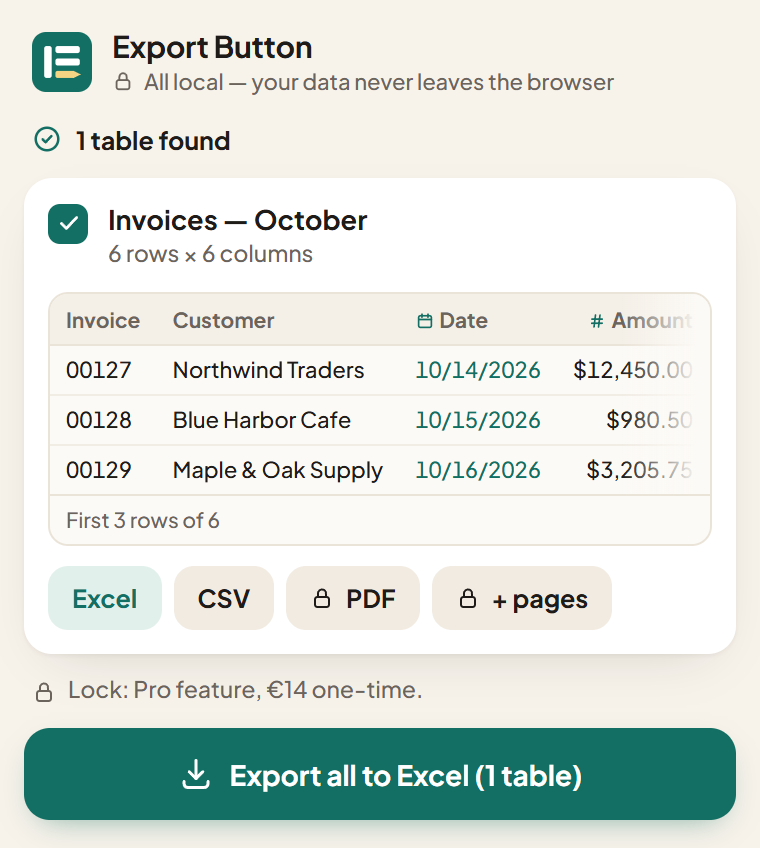
Invoices — October
| Invoice | Customer | Date | Amount | ZIP |
|---|---|---|---|---|
| 00127 | Northwind Traders | 10/14/2026 | $12,450.00 | 02134 |
| 00128 | Blue Harbor Cafe | 10/15/2026 | $980.50 | 07030 |
| 00129 | Maple & Oak Supply | 10/16/2026 | $3,205.75 | 05401 |
| 00130 | Summit Dental Group | 10/20/2026 | $1,140.00 | 03101 |
| 00131 | Riverside Print Shop | 10/22/2026 | $27,300.00 | 06103 |
| 00132 | Lakeview Bakery | 10/27/2026 | $615.20 | 01002 |
Copy and paste breaks your data. This doesn't.
A table pasted into Excel looks fine until you try to use it. These are the things Export Button fixes on its own, before the file reaches you.
Numbers stay numbers
Amounts with currency symbols and thousands separators become real numbers, in any format: $1,234.56, 1.234,56 €, R$ 1.234,56. The separator is worked out from the whole column.
Dates become dates
10/14/2026, 14/10/2026, Oct 14, 2026: day and month order is read from the column, so dates sort and filter the way they should.
Codes keep their zeros
ZIP codes, invoice numbers, tax IDs and phone numbers stay exactly as written. No more 02134 turning into 2134.
The tables other tools miss
Tables inside iframes, a frozen first column next to the scrolling ones, headers kept in a separate table, data split across many pages. It finds them and puts them back together.
Three steps, nothing to set up
Pin the icon
After installing, click the puzzle piece at the top right of the browser and pin Export Button, so it's always one click away.
Open the page with your table
A company portal, an old ERP screen, a report, a public page. Click the icon: the tables are listed, and each one lights up on the page as you hover it.
Choose Excel or CSV
The file is built in your browser and downloaded, already formatted with filters on. Open it and get to work.
Your office data stays in your browser
Export Button reads the table and builds the file on your computer. No servers, no account, no tracking. That's why it's safe on internal portals too.
Free for everyday use. Pro is a one-time payment.
Free
€0 forever
- Export one table at a time to Excel or CSV
- All the automatic cleaning
- Formatted Excel with filters on
- No row limit
Pro
€14 once, yours forever
- Everything in Free
- Merges a table split across many pages, clicking “Next” for you
- Saved exports you repeat with one click
- PDF export
- Several tables in one Excel file
Guides
Fixing a pasted table by hand? These guides explain why it breaks and how to fix it, with or without the extension.
How to export a table from a website to Excel
Copy and paste, Excel's “From Web”, or an extension: what each one handles, and where it fails.
Read the guide →
Why Excel removes leading zeros, and how to keep them
ZIP codes, IDs and phone numbers that lose their first zero, or turn into 3.33E+10.
Read the guide →
Numbers pasted from a website become text in Excel
Sums that return 0, and 1,234 that becomes 1.234: commas, dots and how to fix them.
Read the guide →
Try it on your own table.
Free, no account, a few seconds to install. Or try it first on a sample table.